Desktop Question?
10 replies · 3507 views

For MONTHS i've had a plain black background. Boring right? Well heres why:
One day my lil brother decideds to go into my room when I'm not in it, and bang on my keyboard. Ever since then, the icons on my desktop show up black instead of blending in with any background I choose. Heres a couple pics to explain better.
how my desktop looks now:

how it looks if I try and use a background other than black: :yuckky:

can someone help me please?
I know, it`s german, but I think you understand what I want to show 
At first to right-click on desktop and then click on " attributes" or it`s called in english. And then try this
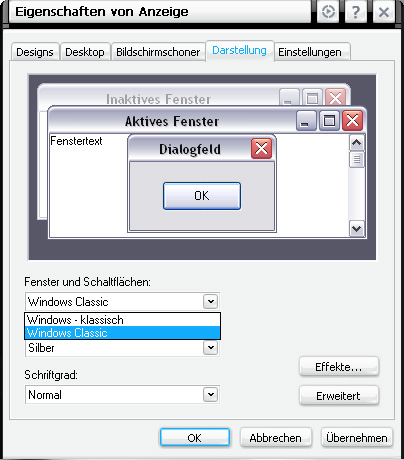
It didnt work 
The only thing that changed was now there isn't so much black around the actual icon, but the text still has a black background

Sadly, that didn't work either. I really don't know whats wrong. But thank you

What I think is wrong is the following.
(you have to make sure that hidden files and protected OS system files are visable)
Go to c:/WINNT and find the file ShellIconCache (it will be hidden). Delete that file and reboot your computer, all the icons should refresh and then you should see them normaly again.
What I think is wrong is the following.(you have to make sure that hidden files and protected OS system files are visable)
Go to c:/WINNT and find the file ShellIconCache (it will be hidden). Delete that file and reboot your computer, all the icons should refresh and then you should see them normaly again.
<{POST_SNAPBACK}>
I hope im not asking a stupid question, but where is "c:/WINNT" 
go to My Computer, then the C: drive, then the folder WINNT.
if you havent enabled show hidden files here is how you do it
http://www.microsoft.com/resources/documen...extensions.mspx

Try this
Go to your "Control Panel"
Click on "Performance and Maintaince"
Click on "Adjust Visual Effects"
Scroll down and check or uncheck "Use drop shadows for icon labels on desktop"
If none of that works, you could try Tweak UI from the Microsoft Powertoys range (it's free). Don't know if anything in there will help your specific problem, but there are a whole bunch of icon options (as well as other goodies).
go to My Computer, then the C: drive, then the folder WINNT.if you havent enabled show hidden files here is how you do it
http://www.microsoft.com/resources/documen...extensions.mspx
<{POST_SNAPBACK}>
That folder isnt there, and I enabled the hidden files.... <_< Ay yi yi. Sorry this is such a pain, but I thank you for your help