Signature Banner
5 replies · 2452 views

Hi,
I'm new and just created a banner for my signature on Bannersnack. However, I am not sure how to post it on my profile. I've tried using links and coding but it's just showing the links and coding not the image. If anyone can help it would be appreciated. Thanks.

Hi! 
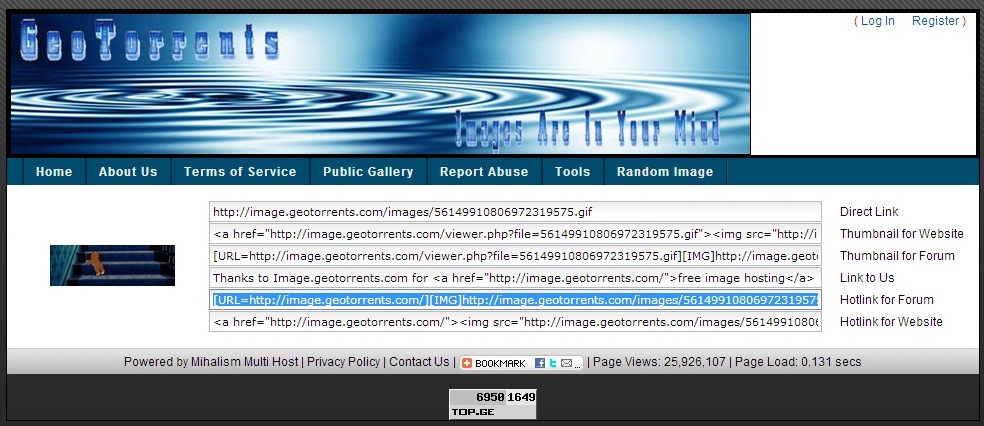
when you uplaod any pic to image uploader, you should copy/paste BB Codes for forums!
http://image.geotorrents.com/ upload pic on that site and then copy/paste second link from the bottom, it's BB Code aka Hotlink for Forum
Thanks Sick,
I used the bbc codes and put in html then entered code and the banner appears, but when I save it it disappears and all that shows is:
Any way to make is stop disappearing?

Once the banner is created, try to save it onto your computer and upload it onto a host that provides BBCodes like tinypic.com.
Make sure the banner is no more than 600 x 140 pixels.
Thanks Pink. It was a gif but lost it's movement. Oh well.. at least I got it somewhat working.
Thanks Sick,
I used the bbc codes and put in html then entered code and the banner appears, but when I save it it disappears and all that shows is:
Any way to make is stop disappearing?
you don't need to put them in html or anything, just copy-paste and that's all http://image.geotorrents.com/ usually can be used for gifs, I uploaded my signature gifs on that host and it works!
like that