Problems and Suggestions for BZ - Post Here Pinned
4951 replies · 732154 views

1 hour ago, Matt! said:@maddog107 @PrettyDeadThings Any updates on what’s happening?

We updated the forums to the latest version and all my custom patches broke 
Need some time to go through them all and fix the bugs. I just re-applied a few, can you guys check and let me know what you find? Thanks.

19 minutes ago, maddog107 said:We updated the forums to the latest version and all my custom patches broke
Need some time to go through them all and fix the bugs. I just re-applied a few, can you guys check and let me know what you find? Thanks.
The spoiler tag function still isn't working. Can you also temporarily extend the edit period to 7 days once that functionality is enabled so we can go back edit the posts with videos to put them under the spoiler tags?

32 minutes ago, maddog107 said:We updated the forums to the latest version and all my custom patches broke
Need some time to go through them all and fix the bugs. I just re-applied a few, can you guys check and let me know what you find? Thanks.

ssstwitter.com_1769478640414.mp4
test test test test
test
test
Looks like most features are back to normal (obviously you can’t test everything). The spoiler tag is visible again, but still unresponsive.
EDIT: also, videos can no longer be center-aligned like before (was it even a thing?) IT WAS.
EDIT2: YT links can be aligned.
EDIT3: If you take a look at Pretty’s comp, for example, you can see that everything is properly aligned, so I’d say things are mostly back to normal. https://www.bellazon.com/main/topic/117945-nations-face-off-voting-started/page/73/#findComment-6116029
test
test
EDIT: nice.
Hi,
How would one go about uploading 600-700 images to a model thread - split them into 6-7 posts, 100 images each, or upload all at once?
Thx!
Howdy @maddog107 , some issues still lingering after last weekend's update:
The spoiler icon on the far right of the edit ribbon does not function. I see it in the drop-down options (+) icon but it would save a click to have it working in the main edit ribbon.
When creating a post (letting the images auto-populate the post without manual insertion), after the post is published, clicking on the images in the post they do not appear in the "light box" window. Manually inserting the images while creating the post enables the light box window, but that method is tedious if you have a lot of pics.
Will we have the ability to go back and edit the posts that contain videos from last Sunday to last Wednesday to put them under the spoiler tags? It would be nice to clean up those posts.
As always, thanks!
Yeah the spoiler not working is really tough.

I noticed it too, I was going to use it to cover Renee Wilkens-Foster topless pics, thankfully in those pics she covered her breasts.

I have the same problem to click the spoiler button & I hope than the mods would fix it & put the warning to the nudity photos with that box.


I will try it, thank you for the advice @Matt! 
4 minutes ago, Vogue Girl said:I will try it, thank you for the advice @Matt!
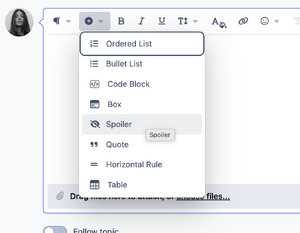
or just use that...
test
test
Thank you once again @Matt!. 

@maddog107 pictures stack vertically instead of horizontally since the update 10 minutes ago
testing
On 2/7/2026 at 2:29 PM, Matt! said:
or just use that...
test
test
please try now.
8 hours ago, Sunshiine said:@maddog107 pictures stack vertically instead of horizontally since the update 10 minutes ago
is this still occuring?
On 2/7/2026 at 2:05 PM, Vogue Girl said:I have the same problem to click the spoiler button & I hope than the mods would fix it & put the warning to the nudity photos with that box.
On 2/6/2026 at 5:57 AM, Molonlave7 said:I noticed it too, I was going to use it to cover Renee Wilkens-Foster topless pics, thankfully in those pics she covered her breasts.
On 2/3/2026 at 7:04 AM, dongwong said:Yeah the spoiler not working is really tough.
please try again.
42 minutes ago, maddog107 said:please try again.
I fix the problem with the click + & appeared spoiler. Thank you.