Computer Problems Pinned
142 replies · 92855 views

how do i do that ? 
i've tried putting a red wallpaper and the red pixels appear black... so could they be dead pixels ? (not really pixels but you know... the red part of pixels).
Also when i change my configuration to 16 RGB colors there are different traces at different places, and i when i launch my computer, on the very first screen there are a lot of those traces in the middle of my screen 

cant help you with your little screen problem (which looks like little subliminal messages by the way  ) but i can tell you you can download limewire pro right off limewire. and get the new itunes

Those weird traces have appeared on the top of my computer's screen, any idea what it is ?
have noticed that similar traces also appear on HQ pictures sometimes, when i look at them full-size
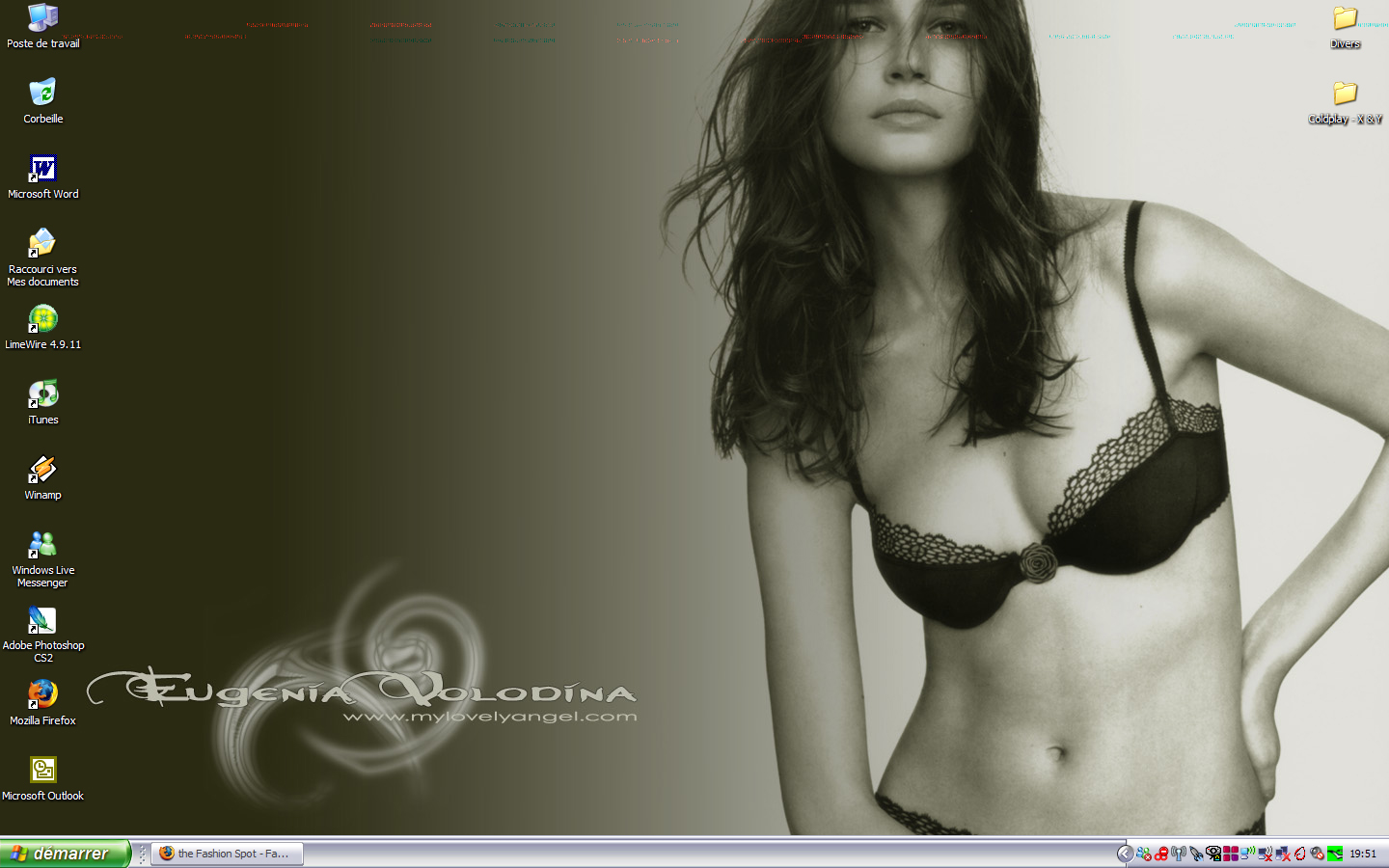
hmm interesting, i must say though nice paper 
cant help you with your little screen problem (which looks like little subliminal messages by the way
i don't like the new itunes
and i know about limewire but i'm too lazy, i barely use it anyways
thanks for not helping me out
Those weird traces have appeared on the top of my computer's screen, any idea what it is ?
have noticed that similar traces also appear on HQ pictures sometimes, when i look at them full-size
hmm interesting, i must say though nice paper
those weird traces ruin it 
that's weird... have no clue 
anyway, this is not about dead pixels, i think. because we see the same traces...
i booted my computer in safe mode and that is what i got:

This time, some of the dots were flashing 
these coloured dots are similar (same place) than the one i get on the very first screen of my computer, then there's not dots at all for 2 or 3 black screens, and then the red and blue traces (see first pic) appear when i enter my password and when i'm on my desktop

It's probably your video card. Try opening your computer and taking it out and put it back in. I had a problem like that with red lines but I couldn;t see my screen, had to replace the video card. Also clean your computer, maybe its dust.
how do i clean my computer ?
and i'm so not opening my computer, i'm sure i'll do something wrong and wreck it it's under warranty for another year and a half so i think i'll just take it to the store if i need to open it 
thanks for sharing your experience 

You can also try to update the videocard drivers.
You can also try to update the videocard drivers.
 agreed! i think this is all software troubles... try to update drivers or remove and then install current again.
btw, when this began?
how do i clean my computer ?and i'm so not opening my computer, i'm sure i'll do something wrong and wreck it
thanks for sharing your experience
It's easy actually. Open it up and get a can of compressed air and spray that dust away. And taking out the video card it easy to but if its under warranty you can always take it in
cant help you with your little screen problem (which looks like little subliminal messages by the wayi don't like the new itunes
and i know about limewire but i'm too lazy, i barely use it anyways
thanks for not helping me out
whats wrong with the new itunes? 
how do i clean my computer ?and i'm so not opening my computer, i'm sure i'll do something wrong and wreck it
thanks for sharing your experience
It's easy actually. Open it up and get a can of compressed air and spray that dust away. And taking out the video card it easy to
are they those cans when you turn them upside down and spray them you can freeze stuff 
yes they are, there pretty cold

You can also try to update the videocard drivers.
^ that was gonna be my second suggestion 
and what MLA said to clean out the dust could help as well as making sure the connection from the monitor to the video card is secure, perhaps disconect and reconect.
oh and you know i dont like her much, but she does look good in that pic 
You can also try to update the videocard drivers.
btw, when this began?
Thanks you two, i'll try to see if i can manage to do that
I think this began like 3 days ago... that's when i noticed it anyways and it's so obvious that i doubt i could have ignored it for a few days
It's easy actually. Open it up and get a can of compressed air and spray that dust away. And taking out the video card it easy to
thing is some warranties prevent you from opening the computer, if i do it and wreck something then they'll tell me to go fuck myself
whats wrong with the new itunes?
i don't really like the new look, but i guess i'll update my version when i get my new iPod anyways
You can also try to update the videocard drivers.^ that was gonna be my second suggestion
and what MLA said to clean out the dust could help as well as making sure the connection from the monitor to the video card is secure, perhaps disconect and reconect.
i'm gonna see what i can do... thanks !
oh and you know i dont like her much, but she does look good in that pic
