How To Get HQ Pictures From Online (PLEASE READ FIRST POST PRIOR TO POSTING)
2650 replies · 280342 views

can it be downloaded in hq's from H&M catalogue ?
Thank you, Wils.
You're welcome
hi, does anybody know how to get hq photos from Warwick Saint site?
http://www.warwicksaint.com/photographer/gallery
or from randee st. nicholas site?


*cough*
Hi,
does anyone know how to get HQ pictures from contrasto.it?
like this one
http://comserver.contrasto.confessmedia.co...TO_00886458.jpg

thanks!!! 
Please help me with otto.de or baur.de HQ pictures .
Example link:
http://www.otto.de/is-bin/INTERSHOP.enfini...ure=4196875.jpg

or
http://image02.otto.de/pool/ov_formatg/4196875.jpg

It's very important to me and i would by grateful:) PLEASE
Thanks.
Please help me with otto.de or baur.de HQ pictures .Example link:
http://www.otto.de/is-bin/INTERSHOP.enfini...ure=4196875.jpg
or
http://image02.otto.de/pool/ov_formatg/4196875.jpg
It's very important to me and i would by grateful:) PLEASE
Thanks.
I would like to know,too. 
What about style.com??? Is there a way to get HQ runway shots from there.
I've tried replacing the m (for medium I assume), with every letter in the alphabet. A few letters came up with other small variations. XXL, LARGE, and HQ don't work either.

anyone knows how i could get pictures in HQ from NEXT.co.uk?
 same question.
if your using mozilla:
open the picture: http://www.next.co.uk/shopping/men/casualwear/1/1
then click a side with right button on view page source and start to look for this link
zoomURL:" http://cdn.next.co.uk/COMMON/Items/Default...66-319-X47s.jpg "

thank you liika

How to get HQ images from freemans:
From the original image link, take the numbers after the squiggly
http://images.freemans.com/is/image/OttoUK/FMSPD/Grey-Connection-Jacket~852366FRSP.jpg
and paste them into this
http://s7ondemand4.scene7.com/is/image/OttoUK/852366FRSP?wid=768&hei=1000&op_sharpen=1
So whatever the image just use
http://s7ondemand4.scene7.com/is/image/OttoUK/XXXXX?wid=768&hei=1000&op_sharpen=1
and replace the XXXXX with the image number thing like 852366FRSP
And now for one I've been wanting to figure out for a long time: J.CREW!!!
If you right click on a product image and select view image you will have a link that looks like this:
http://images.jcrew.com/erez4/cache/images_onFigure_97_97759_97759_GR6486_m_tif_fb420c820b3919a3.jpg'>http://images.jcrew.com/erez4/cache/images_onFigure_97_97759_97759_GR6486_m_tif_fb420c820b3919a3.jpg
Delete the text and underscores (_) highlighted in red and replace them with forward slashes. So this...
http://images.jcrew.com/erez4/cache/images_onFigure_97_97759_97759_GR6486_m_tif_fb420c820b3919a3.jpg
becomes like this...
http://images.jcrew.com/images/onFigure/97/97759/97759_GR6486_m_tif_fb420c820b3919a3.jpg
Delete the underscore between the m and tif portion at the end and replace with a period. Delete all text after the tif and hit enter!
the final image url should look just like this but with different numbers:
http://images.jcrew.com/images/onFigure/97/97759/97759_GR6486_m.tif

Would anybody be so kind as to explain to me how to get pictures from this website just to begin with? But, HQ pictures would be nice, too. 

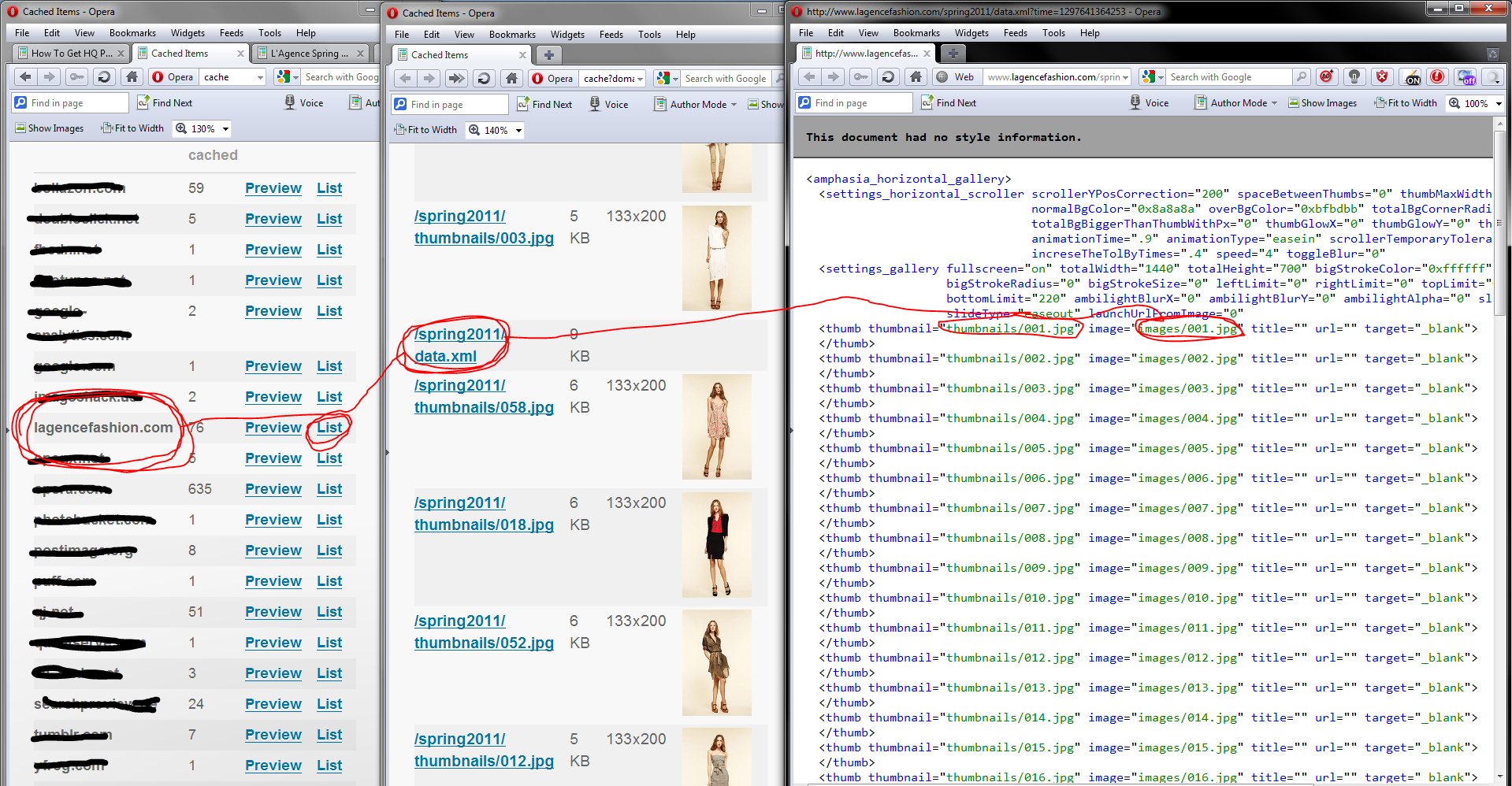
^They don't have HQs, far as I can tell. Images are located here though:
http://www.lagencefashion.com/spring2011/images/001.jpg

http://www.lagencefashion.com/spring2011/images/002.jpg

http://www.lagencefashion.com/spring2011/images/003.jpg

..up to
http://www.lagencefashion.com/spring2011/images/068.jpg

 Don, you are one of the most amazing people I have ever been fortunate enough to virtually meet. Thank you, so, so much. Just a question, would you mind explaining how you figured out the codes for the images, or would that be too long, drawn-out, and confusing?
Well, it looks like viewing the page sources doesn't reveal anything about their link structure, but if you're using firefox, you could do this:
Go clear recent history, delete all cache and then load ONLY the page the stuff is on, NOTHING ELSE.

Once the 1 page is loaded, go in the address bar and type "about:cache" and hit enter.

If you cleared everything right, look under "Disk cache device" and list cache entries.

It then shows urls for everything that was stored on the computer when the page loaded.


This will work for nearly any site where there is stuff that you can't seem to get or right click, IE the VS Pink site for videos. There, you would just be looking for a different file extension like .flv
Well, it looks like viewing the page sources doesn't reveal anything about their link structure, but if you're using firefox, you could do this:Go clear recent history, delete all cache and then load ONLY the page the stuff is on, NOTHING ELSE.
Once the 1 page is loaded, go in the address bar and type "about:cache" and hit enter.
If you cleared everything right, look under "Disk cache device" and list cache entries.
It then shows urls for everything that was stored on the computer when the page loaded.
This will work for nearly any site where there is stuff that you can't seem to get or right click, IE the VS Pink site for videos. There, you would just be looking for a different file extension like .flv