Problems and Suggestions for BZ - Post Here Pinned
4951 replies · 732404 views

25 minutes ago, ILUVAdrianaLima said:@maddog107 We have and its still the same issue and Pink's is a whole other interface that I'm not fond of. I guess many just want the forum pages not narrow as they are now.
+ 1. It's back to normal in the threads, but the home page is TOO bright ...
@maddog107I think i found a new bug. In the INBOX, the small avatar preview are all distorted for me ...

1 hour ago, jj3 said:@maddog107I think i found a new bug. In the INBOX, the small avatar preview are all distorted for me ...
screenshot plz

Is the auto refresh when you back out of threads not working part of the current bug that you guys are trying to fix?

I have frequent problems trying to access the site initially. Sometimes, I.E. when following a link via email, all I see is a nearly blank page, with very light grey that is probably a couple lines of text, and the remainder is a large block of light grey. This appears on Chrome, FireFox and my iPhone in Safari also.
Other times, I get a strange secure site security warning, with no usual work-around in Chrome or Firefox (usually, you can click Advanced, allow the exception, and enter the site anyway). That's usually when the site's SSL certificate doesn't match the site's URL. In this case, the browser insists the administrator has configured the site incorrectly, and it won't budge. I'll get a screenshot of that when it next occurs.
I mostly post this to see if that happens to others, and/or is a known issue (I scrolled back a bit and didn't notice it reported). I'll probably eventually figure out the pattern and post back . . .

3 hours ago, Joe'sCat said:I have frequent problems trying to access the site initially. Sometimes, I.E. when following a link via email, all I see is a nearly blank page, with very light grey that is probably a couple lines of text, and the remainder is a large block of light grey. This appears on Chrome, FireFox and my iPhone in Safari also.
Other times, I get a strange secure site security warning, with no usual work-around in Chrome or Firefox (usually, you can click Advanced, allow the exception, and enter the site anyway). That's usually when the site's SSL certificate doesn't match the site's URL. In this case, the browser insists the administrator has configured the site incorrectly, and it won't budge. I'll get a screenshot of that when it next occurs.
I mostly post this to see if that happens to others, and/or is a known issue (I scrolled back a bit and didn't notice it reported). I'll probably eventually figure out the pattern and post back . . .

Thats strange, can you post a link from the original email? What browser are you running? What OS?
5 hours ago, Stromboli1 said:Is the auto refresh when you back out of threads not working part of the current bug that you guys are trying to fix?
Didn't follow, whats the auto refresh?
Just now, maddog107 said:Didn't follow, whats the auto refresh?
Whenever you back out of threads on BZ, the site used to automatically reload the page. Now you have to reload the page manually for current posts.
22 hours ago, maddog107 said:
screenshot plz
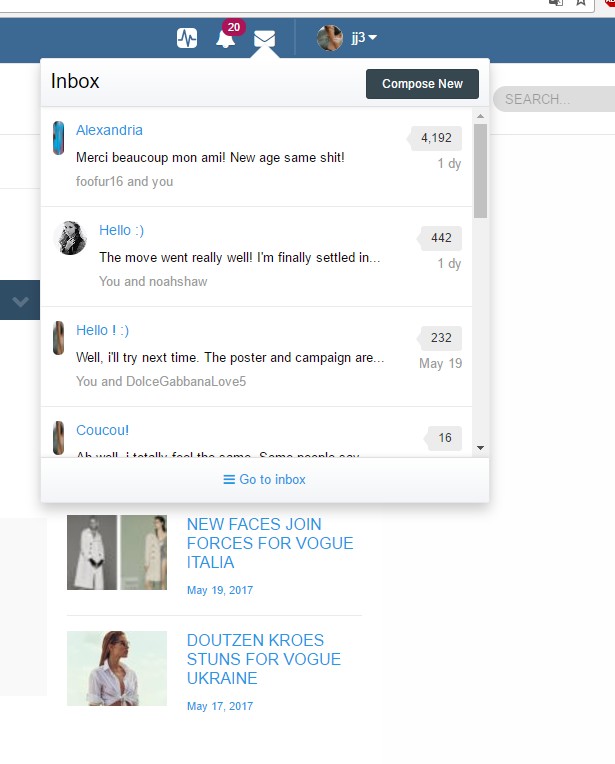
1 hour ago, jj3 said:
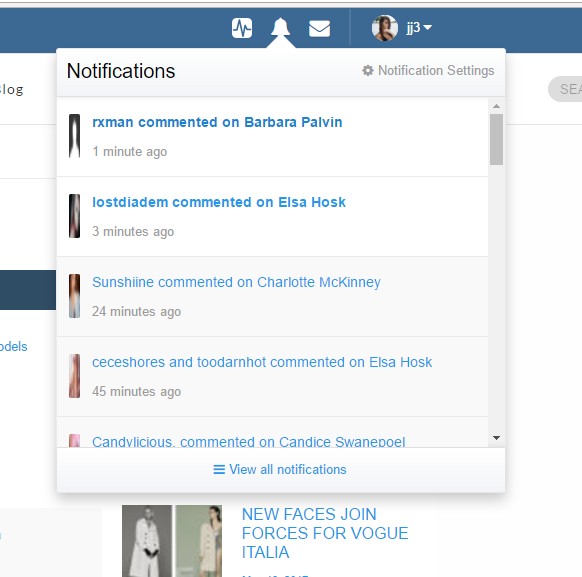
4 hours ago, jj3 said:
Ok i was able to reproduce. Thanks ill look into it.
@jj3 should be better now.

I have started a new topic for Camille Cerf in 'Other Females of Interest' and I want to set this pic as thumbnail.
Could some adminstator set it for me ?
Thanks.

A problem I've noticed over the last week or so is, that while using the Microsoft Edge web browser, the drop down menus at the top of the screen located in the upper right of the page on the blue bar are not there. The envelope icon that you click on to bring up your most recent Private Messages is not their, nor is the Notifications icon, nor is the user's avatar and screen name present as well. I've tried disabling the adblocker to see if that was causing it, but that doesn't do anything to solve the problem.
Thanks. 
On 5/28/2017 at 1:06 PM, VS19 said:A problem I've noticed over the last week or so is, that while using the Microsoft Edge web browser, the drop down menus at the top of the screen located in the upper right of the page on the blue bar are not there. The envelope icon that you click on to bring up your most recent Private Messages is not their, nor is the Notifications icon, nor is the user's avatar and screen name present as well. I've tried disabling the adblocker to see if that was causing it, but that doesn't do anything to solve the problem.
Thanks.
Can you please check now and see if its resolved? Thanks.
11 hours ago, maddog107 said:
Can you please check now and see if its resolved? Thanks.
Seems to be functioning properly. Thanks.

Are we only going to have the default blue color or are we going to get option to choose a color themes. Is just that I really don't like the blue.

i can't find my friends in the inbox either the members to search in the new layout. Thanks.
19 hours ago, cpmary said:i can't find my friends in the inbox either the members to search in the new layout. Thanks.
Sorry I didnt understand, you cant access your inbox? Are you on a desktop or ipad or phone? Any screenshots you can provide? Thanks.