Problems and Suggestions for BZ - Post Here Pinned
4951 replies · 732185 views

57 minutes ago, TheDude2k said:I spoke too soon... now I'm getting 100% failure on uploads: "Sorry, an unknown server error occurred when uploading this file. (Error code: -200)."
Even editing posts aren't working correctly (from my reply immediately above): "This comment can no longer be edited. It may have been moved or deleted, or too much time may have passed since it was posted for it to be edited."
Ok I disabled one of the three security rules. Hopefully that is the one causing issues. Let me know. Thanks.

19 minutes ago, maddog107 said:Ok I disabled one of the three security rules. Hopefully that is the one causing issues. Let me know. Thanks.
Uploads are working again.

@maddog107 More feedback: the uploaded embedded videos are displayed at a size of the full width of the post frame, which makes them huge, especially the vertical portrait videos. Perhaps display the videos at their native resolution?

15 hours ago, TheDude2k said:There are 3 icons on the bottom left side to change the light/dark mode.
i meant the whole layout of the site but i missed the announcement that things had changed
2 hours ago, ghostops117 said:i meant the whole layout of the site but i missed the announcement that things had changed
It wasnt planned 
Something changed and the website was unusable, we had to do an emergency upgrade to the next major version of the software to alleviate the pressure on the server. We will slowly change the look back to how it was if possible.
Sorry for the inconvenience.
Spoiler
test
Spoiler
testing
On 5/11/2025 at 9:26 AM, LeftPhalange said:Do we know how to spoiler a post on the new layout?
I thought it could be the 'wrap in box' feature as it has an 'expandable' option. However I just posted the largest video thumbnail of all time, instead.
Brain no good.🤕
23 hours ago, MergeIntoOmniThing said:Hi, yes, similarly, i was wondering about the spoiler tag, and Adult Content toggle / tab / option, as I can't find them anymore either. Thanks for the upgrade / server maintenance, btw!
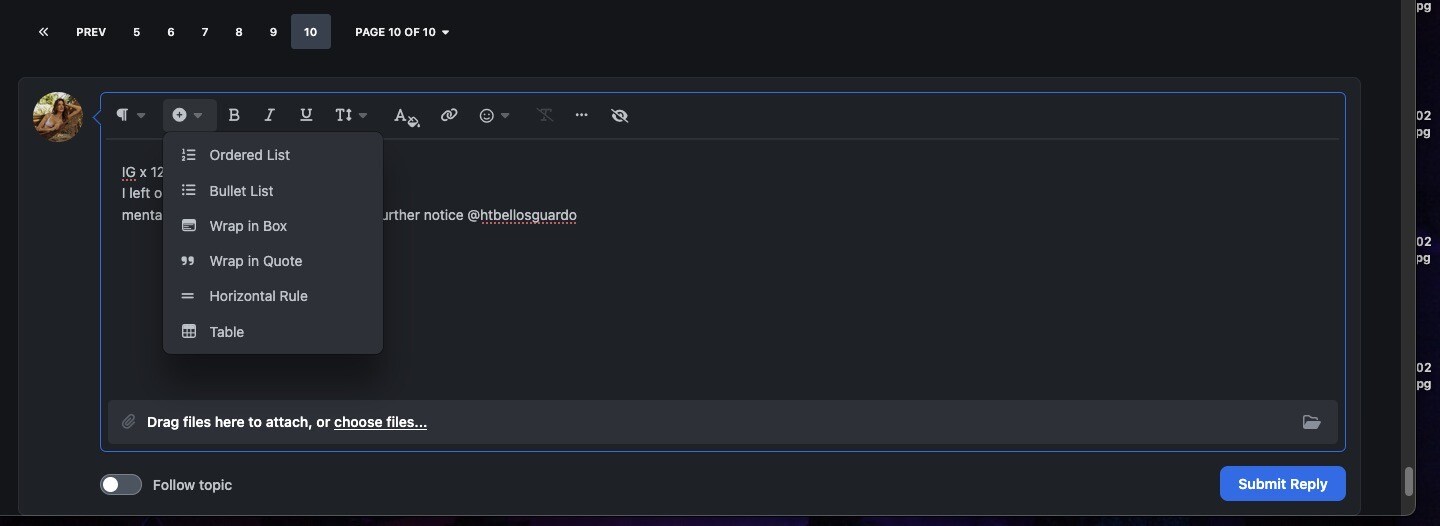
There is now a spoiler in the little plus (+) menu on the toolbar. I am trying to get it onto the main menu bar but havent figure it out yet. Let me know if you have any issues.
Spoiler
asds

@maddog107 Thank you for tackling this along with the other issues, much appreciated. 😊

@maddog107 thank you for your time and dedication by reformatting everything in addition to keeping BZ up and running. 

5 hours ago, maddog107 said:There is now a spoiler in the little plus (+) menu on the toolbar. I am trying to get it onto the main menu bar but havent figure it out yet. Let me know if you have any issues.
Hmmm. I am not seeing the spoiler option, unless I missed it. I am not sure if this is related, but the "eye" icon with the diagonal strikethrough was also not working for me. I am on Firefox on a Mac, fwiw.
Spoiler
1 hour ago, MergeIntoOmniThing said:Hmmm. I am not seeing the spoiler option, unless I missed it. I am not sure if this is related, but the "eye" icon with the diagonal strikethrough was also not working for me. I am on Firefox on a Mac, fwiw.
Yea its the "eye" i figured out how to move it tot he main toolbar. So if you highlight something and click the eye nothing happens?
Testing FF with mac.
Spoiler
hidden
Spoiler
adfasdf
1 minute ago, maddog107 said:
Spoiler
Yea its the "eye" i figured out how to move it tot he main toolbar. So if you highlight something and click the eye nothing happens?
Whoops, totally my bad. User error. I think we are resolved for this particular issue; sorry to bother you.
Spoiler
testing 123
empty spoiler without content
Spoiler
5 minutes ago, MergeIntoOmniThing said:
Spoiler
adfasdf
Whoops, totally my bad. User error. I think we are resolved for this particular issue; sorry to bother you.
Nope you actually were correct, so it only worked if you highlighted text, but many people chose spoiler first and then populate it with content.
Now its working both ways, thanks for bringing it to my attention :)
Any line of sight to fixing the pics stacking instead of having them side-by-side with a space in between? Right now, I'm manually editing the post to make them side-by-side.
1 hour ago, TheDude2k said:Any line of sight to fixing the pics stacking instead of having them side-by-side with a space in between? Right now, I'm manually editing the post to make them side-by-side.
I posted the question in the official invision power board forum and I am reading the dev docs but havent figured out how that would be done. Sorry.