MattLoveModels
2771 replies · 51590 views

Donbot, what program do you use to make your animated avatars?

Photoshop 
Photoshop
You can't import AVI's into PS, can you? 
Well you can go File > Import > Video Frames to Layers, but you only get moderate success with that. Most of the time it doesn't work, or only half works, depending on the codec of the video I suppose. What I do is use another program (VirtualDub) to convert the video to an image sequence, then batch open those images into a Photoshop document 

why does this sound so complicated...

 I even won´t pretend I understand that.
Matt, youre taste in beautiful women is excellent 

There might be better/easier ways to do things.. I just do it the way I know how
Matt, if you have CS2 then you should have another program called ImageReady which you can use for doing GIFs. They merged its features with Photoshop in CS3 and beyond, but it used to be a stand-alone program. You asked about how to do a simple multiple pic GIF - that's pretty easy.
I'm using Photoshop CS3 here, but from memory ImageReady will work pretty much the same, with the layers and animation timeline and all.
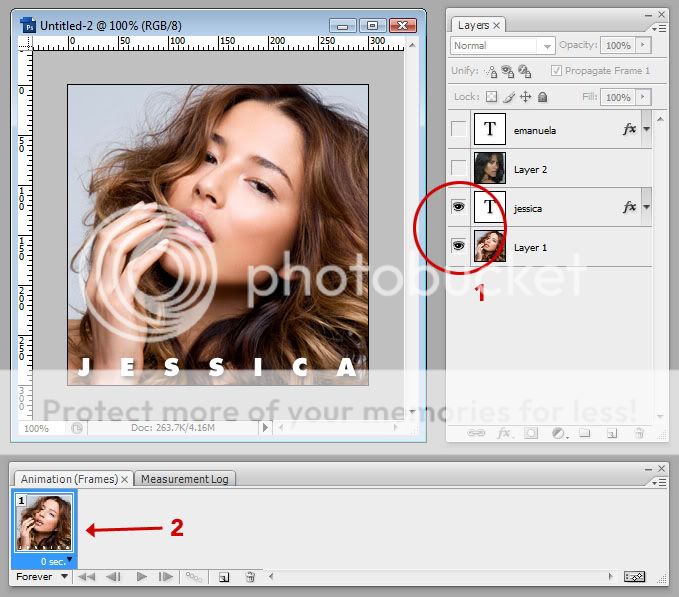
1. Create the image you want for the first frame
2. You can see here I've also prepared the graphics for the second frame, but only the Frame 1 layers are visible [1]
3. Right now there's only a single frame of the animation, and only the visible layers will show [2]
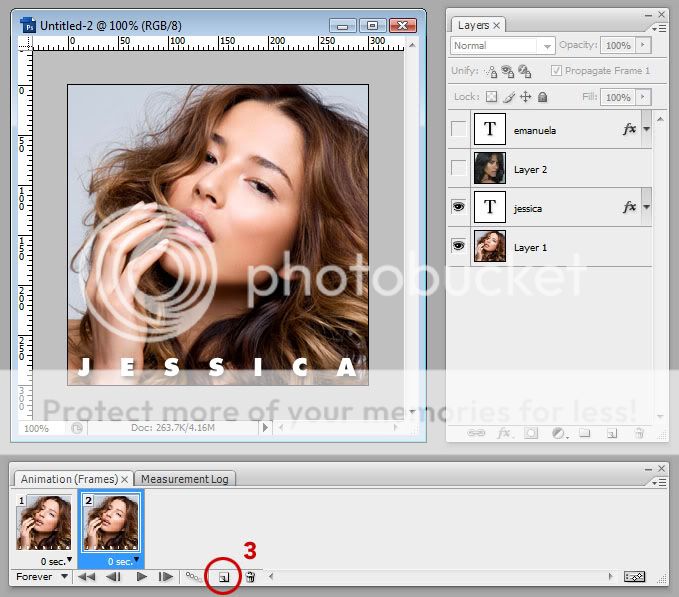
4. Create a new frame. It will duplicate the previous one [3]
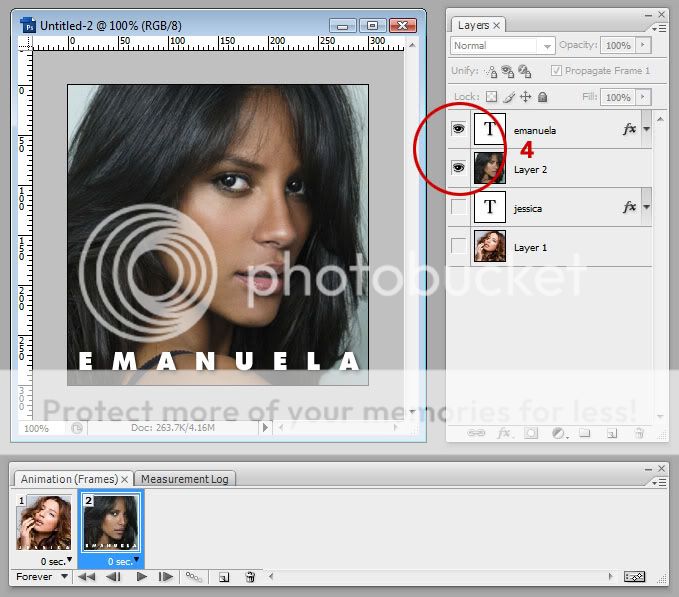
5. Now hide (don't delete) all the stuff from Frame 1, and make visible what you want for Frame 2 [4]
6. You can see in the animation timeline that Frame 1 has stayed the same, and only the selected frame is updated with the layer visibility
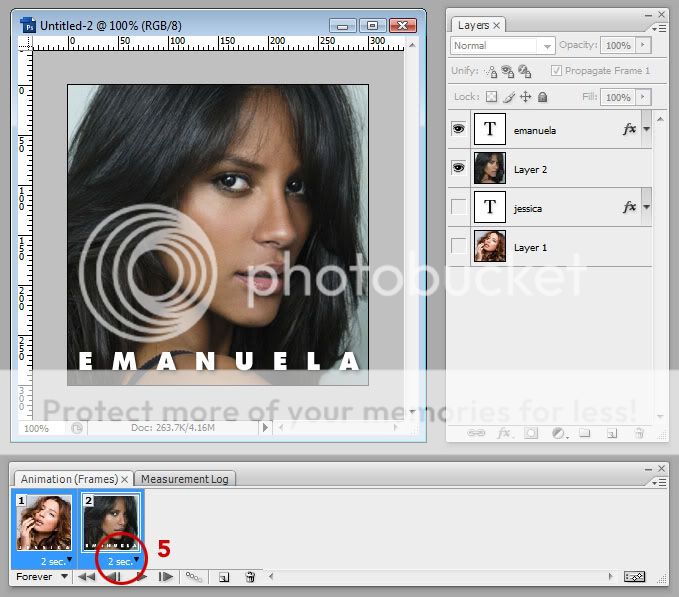
7. Keep going for however many frames you want to do
8. Once you've finished the animation, select all the layers and set the frame delay (how long you want each one to linger) [5]
9. Save the image as a GIF (in Photoshop you have to go File > Save for Web & Devices, but I think in ImageReady you just go File > Save As)


thanks! yeah i have imageready. i shall try this
Matt, youre taste in beautiful women is excellent
thank you
Total Video Converter and Ulead Gif Animator 5 is all you need 
Of course they have to be legally registered versions, but who does that nowadays?

Well you can go File > Import > Video Frames to Layers, but you only get moderate success with that. Most of the time it doesn't work, or only half works, depending on the codec of the video I suppose. What I do is use another program (VirtualDub) to convert the video to an image sequence, then batch open those images into a Photoshop document
Sorry that I'm not coming to say hi to Matt but... 
Don, I use CS4, I think it's similar to yours 
File --> Import --> Video Frames to Layers --> Type the file name in the file name box,
the window will automatically show every type of file you have 
Ignore me if CS4 is different

Haven't been here in a while so I thought I might geek it up a little


making gifs is cool and all, and imma try that soon, but ed's post is one of the best ever in my thread.
also, who dat?
Ditto  She's so cute
Hahaha nice Kanye moment, Matt.
Her name is Shay Maria. I could post more pics but I'm sure you'll be typing her name in Goog... hello? you still there? MATT?
I'm here now
She kind of reminds me of the love of my life, the cellist for Ra Ra Riot

That was quick 
Alexandra Lawn *swoon* I'mm a go listen to some Ra Ra Riot now 
Hahaha nice Kanye moment, Matt.Her name is Shay Maria. I could post more pics but I'm sure you'll be typing her name in Goog... hello? you still there? MATT?
Boobs + glasses = instant win
That was quickAlexandra Lawn *swoon*
You know of her? Thought her hotness was still on the down low. Just don't tell anyone about it. Decreases my nonexistent chance
Hahaha nice Kanye moment, Matt.Her name is Shay Maria. I could post more pics but I'm sure you'll be typing her name in Goog... hello? you still there? MATT?
Boobs + glasses = instant win
yeah especially when they're worn on her face...
She can wear 'em on her boobs as well if she prefers...