Capt Snow
1677 replies · 30727 views

mike, do you have this picture?

she looks so pretty here 
Agreed 
I have this one, which is a bit bigger. I thought I had scanned it but I can't seem to find it, so maybe I will get around to that catalog sometime soon.

If you don't scan it, I can. It's...somewhere around here.
AgreedI have this one, which is a bit bigger. I thought I had scanned it but I can't seem to find it, so maybe I will get around to that catalog sometime soon.
yay! thank you! 

Feel free,  I'd probably end up taking weeks and weeks to eventually get around to it anyways.
Edit: Welcome OS, 

capt i got the video, what do i do now?
Poke it with a stick, make sure it's not still born. :| Big files take so long to transfer.
Umm, let me take a second to gather some info, and I'll get you started, on the conversion process.
Umm, I need a few things, Resolution, Format (Mpeg I think you said), Filesize. And what filesize you guys are shooting for after conversion. The lower the res the lower the file size is gonna get.
Edit: Make sure the rar pieces go back together fine before we get started with anything else.
2.36 GB (2,543,218,688 bytes)<----file size
720 by 480 resolution
Mpeg
i only extracted two of the files and when i went to look to see if they merged into one it said the file size was 2 gigs, i checked the whole video and it seemed in order
Wait, you were able to extract the files seperately? When you extracted did they all go back together into a single file?
I should say just do you have a single file of the whole show?
Poke it with a stick, make sure it's not still born. :|

omg this is friggen hilarious 
Wait, you were able to extract the files seperately? When you extracted did they all go back together into a single file?I should say just do you have a single file of the whole show?
thats the thing, i only extracted two of the files and they combined and when i saw file size it was two gigs, i opened the file in bs player and low and behold the whole show was there all 40 minutes and i didnt extract all 12 parts, should i still extract the remaining 10 parts?
Glad you appreciate my dark humor.
That's the beauty of Winrar, you open one file, and as long as you have the rest in the same folder, what you see in your window is the full completed file, so it basically extracts from each one by itself and pieces them together. I just wanted to make sure that you did indeed have a single big file, and not a bunch of little ones.
Ok, start by downloading this program, AutoGK, we're gonna use the simplified version of Gordian Knot to do this, since it's a bit easier to use, and only takes a few steps to get going. You can't manipulate as much but it will work for what we need it to do. This program encodes to XviD and DivX, is that fine with you and Keith, theie the standard now, so I don't see why it wouldn't be fine.
Give me a sec, and I'll write up what you need to do next after installing, it's pretty simple, just a couple of steps.
installed
Ok, once you open GK, you should get a window which looks like this below,
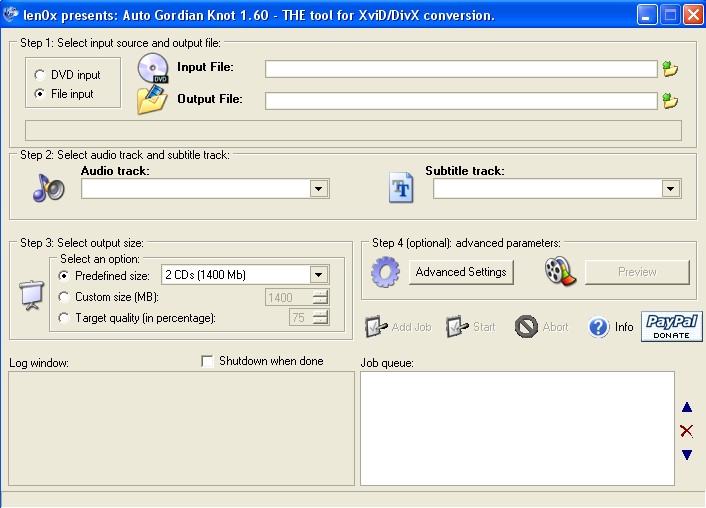
Now on the left you should see, "DVD Input" & "File Input", make sure File input is selected.
To the right of that at the end of the "Input File" field, click the folder icon, and select the big VS file from wherever you saved it to on your comp. Once selected, the "Output File" field should automatically be filled in with the proper input. It will save the new converted Avi file, to wherever you selected the original VS file from, unless you specify a different save spot.
Under step 2, after selecteing the VS file above in step one, this audio selection should automatically select itself for you. You can leave it alone. And you can also leave the Subtitle Track alone also.
Now under step 3, you will see three options you can select: Predefined Size, Custom Size & Target Quality. We want to select Custom Size here. Input your desired final project file size into the field next to this option. If you want 700 select the field and input the number.
Now onto step 4, selecting the advanced settings for the final output file. Click the advanced setting button, and you should be given a window which looks like this below,
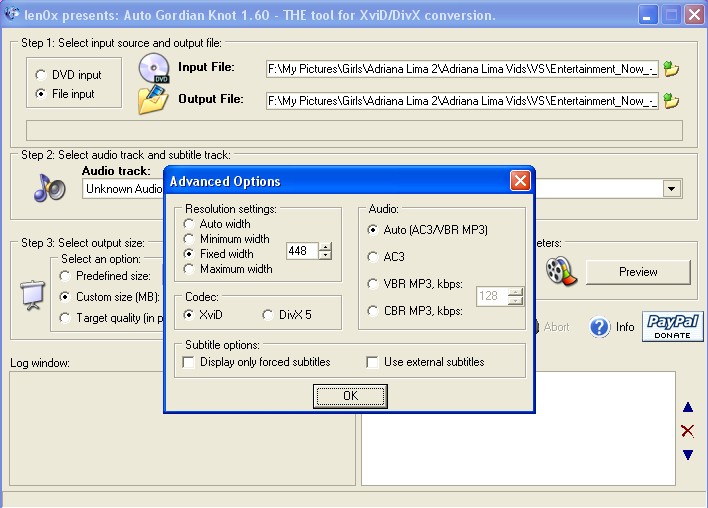
Now under resolution settings, you are given 4 options to choose from: Auto Width, Minimum Width, Fixed Width and Maximum Width. Now we are starting with a resolution of 720x480, so a fixed width of something like 624 or 640 might be decent enough to get the file size down while still trying to keep a decent amount of video quality. Though it's difficult to be sure exactly how good it's going to turn out, it's kind of a guessing game, when it comes to widths. 624 may be fine, but we'll have to test and see if it's low enough to make up for the loss in quality we will get from shrinking it down from 2.2gb to 700mb, or whatever it is you want your finished file size to be.
Now you can take a chance and select auto width, and AutoGK will attempt to give you the best results, it thinks will look best for the other options you have chosen. Don't select Max width or Minimum width.
Now in this same window, you should see to the right of the width selection, "Audio". If it's not already selected, you can choose auto and it will decide between AC3 audio and Mp3. Most of the time it will auto choose Mp3.
To the left and down you will see the selections for codecs to use in the encoding process: XviD and DivX. If XviD isn't shown here, you need to istall it, but I assume that you have it installed. Though you may not have the part of the codec you need to encode, so if XviD doesn't show up in this window as a selection, go get the Full K-Lite codec pack and it has the necessary pieces for encoding. Not sure but I think you already have all that stuff.
Next, below this you should see the options for choosing your subtitle selections. Chances are there is no subtitle file with this Mpeg, so you can leave both of these options unchecked. Click Ok.
Now directly below the "Advanced Options" button, you will see a highlighted button now, which says "Add Job", click that. You will see some text in the job queue below. Now the "Start" button should be highlighted. click this and the program will begin to start it's encoding process.
Now depending on your computer speed, this could take anywhere from an hour or less, up to 12+ hours to finish. I'm thinking you'll end up somwhere in between 1 or 2 hours total maybe. It's CPU intensive, but I think you should be fine surfing or whatever while it's going. I used to use my moms comp to encode full dvd's, she's running 600mhz on her old comp and it took about 12 hours for those to finish. This vs file is considerably smaller, and your computer quite a bit faster, so it really shouldn't take long.
What I might suggest if you have any kind of video splitter, where you can cut a piece like 5-10 seconds from the big file, keep it as Mpeg, and then run it through the program first, so that you can get an idea of what you want the finished resolution to be, it will end up being easier than finding out after 2 hours of encoding that the video is gonna end up not being the right size you want. A ten second piece of the file can encode in a minute or whatever so it's much quicker to find out the proper size you need by doing this.
Umm, I think that is about everything you will need to finish the file, you can mess around with the finished project file size, or resolution however you want or however you think will make it look better. Remember though that the higher the resolution, the more effect it is going to have on the compressed files' quality. Meaning that if you stay at a steady 700mb, but raise the resolution closer back towards, 720 width, the quality will decrease respectively, and the opposite goes as well, make the res smaller, it will look better and better. You have to find a happy medium.
I'm gonna be going to sleep soon, so good luck.
I just realized I didn't mention which codec to choose. Select XviD, it compresses something like 25% better than DivX and outputs better looking files all around.

 Capt and Neo, tomorrow I'll try this process as well...............
But you know whats really crummy about the whole thing?........The camera work by CBS was soooooo bad; it's almost not worth all the trouble...........especially seeing what was on the VS website <_<
But anyway, I think we learned a few new things............... :lost:

my internet download quota has been exceeded
being capped sucks 
being Capt. rocks! :capt:
thought I would drop by and say hi
Howdy Ya'll
being Capt. rocks!
Yes sir it most certainly does.
Actually, Not all that great really.