Board Administration
782 replies · 5730 views

Example, I just tried with Pheno and this is what's happening in the source code
Quote<p>
Testing <a contenteditable="false" data-mentionid="17905" href="https://www.bellazon.com/main/profile/17905-phenobarbie/" id="ips_uid_4458_12">@phenobarbie</a>
</p>
Basically to get a space after her name I have to remove the nbsp; and then type what I want to say
When it works and I can get a space after the name this is what the coding looks like.
Quote<p>
<a contenteditable="false" data-mentionid="17905" href="https://www.bellazon.com/main/profile/17905-phenobarbie/">@phenobarbie</a>
</p>
Edit: I attempted a third @(insert name here), and couldn't put a space behind my name and the coding looks identical to when I'm about to put a space after the name. So I have no idea what's going on.
Quote<p>
<a contenteditable="false" data-mentionid="1004" href="https://www.bellazon.com/main/profile/1004-prettyphile/" id="ips_uid_74_4">@Prettyphile</a>
</p>

Also, if someone is posting for whatever reason the model isn't showing up in the main directory. I was just in the female fashion models section and had just posted in Taylor Hills thread and when I refreshed I couldn't see Taylor Hill. The same thing happened to Lorena. She went from being 4 down from the top to not being there, to being on the top. I'm not sure what's going on, but it seems to disappear when someone is making a post in the thread it disappears from the main page until the post has gone through.


Cant reproduce, so you type the first few letters and then click on the name? Or are you trying to select it with the keyboard and press enter? Or something else?
I’ll try to do it again when I’m at home. It always works on my phone.
I just tried again and when I hit space after the name all it did was highlight the name
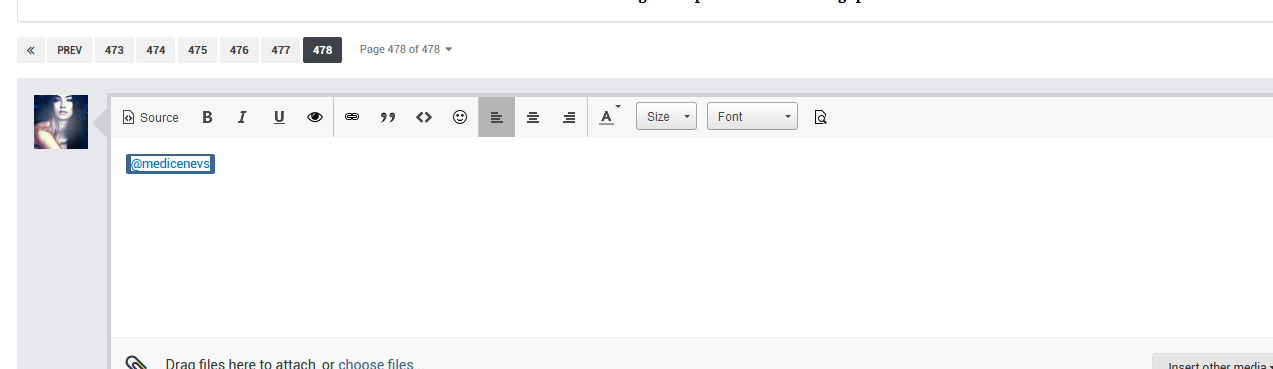
@Prettyphile thats weird. What browser are you using? I use Chrome on a mac.
Its happening on both chrome and firefox for me. Doesnt seem to be happening when I am on a tablet though just pc
Same. And on my iPad and phone there never seems to be a problem. Also the computer that’s on a Linux os doesn’t seem to have any problems.
On 11/3/2018 at 6:29 AM, Prettyphile said:Its happening on both chrome and firefox for me. Doesnt seem to be happening when I am on a tablet though just pc
On 11/3/2018 at 8:07 AM, phenobarbie said:Same. And on my iPad and phone there never seems to be a problem. Also the computer that’s on a Linux os doesn’t seem to have any problems.
Your desktops are Windows?
Yup!
My main computer is windows. I have another computer that predominantly only runs two servers and it’s Linux. There’s a windows shell for couch potato and it doesn’t seem to have a problem. But I’ve only ever tried the one time on that computer.

On 10/31/2018 at 12:57 AM, maddog107 said:
Ok so I did a temporary work around. So essentially the bug is that if you post a picture in the VS thread and then post the *same* picture again in the model thread (say Elsa) it has the same ID, but that causes the image landing page to break. So I did a temp fix that will at least let the images show. The downside is that all the pics from both threads get mixed together.
For example in the VS thread you posted one Elsa + a ton of Ming. So that is showing correctly
https://www.bellazon.com/images/image.php?id=6880625
But if you were to go to Elsa's thread where you just posted the 1 picture and clicked on it, you would still see *all* the Ming ones from this VS thread. But its better to show too many pictures then none at all. This is an edge case that I will fix in the next few days with the dev, its a simple fix but I need him to pass more information to the image landing page.
I just copied an image from the VSFS Gen Disc thread into another thread---same issue 
8 hours ago, PinkCouture said:
I just copied an image from the VSFS Gen Disc thread into another thread---same issue
Link?
And I just got a fix from the dev the other day but been swamped with real life. Ill try to get to it in the next day or two.
11 hours ago, maddog107 said:Link?
And I just got a fix from the dev the other day but been swamped with real life. Ill try to get to it in the next day or two.
I ended up re-uploading the photos but if I have another example I will post it. Thank you! 
3 hours ago, PinkCouture said:
I ended up re-uploading the photos but if I have another example I will post it. Thank you!
So I think the issue with the posting the same image in multiple places is fixed now. So the elsa only shows the elsa one. The VS shows all of them.
https://www.bellazon.com/images/image.php?id=6880625&tid=27120
https://www.bellazon.com/images/image.php?id=6880625&tid=7310
I’ve only really noticed this today. But with a lot of the images pinkie has been posting in the medium quality thread for vs I’m getting a lot of no image found errors when I try and open them. If I edit her post I can right click and open them in a new tab no problem. But just clicking on them in the actual post I’m not able to open them.