Board Administration
782 replies · 5734 views

^ She said she recently posted in both the VS and Barbara Palvin's thread but the post don't show up on her main profile page. I actually checked my profile page too and the post I made in the VS thread recently show up either. It is like the system skipped a couple posts to display.

I have uploaded a new Thumbnail selector for the topics. If you find any bugs please let me know, we are working with the dev to make it a bit better usability.

Trying to take care of some of these reports if anyone wants to join 

1 hour ago, katchitup said:Trying to take care of some of these reports if anyone wants to join

Hmm weird, my reporting button is empty. I was wondering why people were reporting nudity to me directly in the help thread 
Probably this elasticsearch issues we have been having. Should be resolved next week though.
@maddog107: For some reason the site if very slow on my phone. The pages takes awhile to load and when I type a reply there is 3-5 second delay until the text slowly appears. My phone is fine on other sites and apps, and the site is also fine on my laptop.
17 minutes ago, PinkCouture said:@maddog107: For some reason the site if very slow on my phone. The pages takes awhile to load and when I type a reply there is 3-5 second delay until the text slowly appears. My phone is fine on other sites and apps, and the site is also fine on my laptop.
OK i will take a look. I have an old phone so its always incredibly slow on my phone anyways 
Everyone else experience the same issue?

So I've been uploading images using our attachment and every once in a while when I try to open the picture I'm getting this.  Don't know if it's a me thing or what.


I’ve noticed something similar to what pretty is showing. Also sometimes when opening a picture in the middle of a group of other pictures it’ll hang on that blank page but if you use the arrow key to go to previous posts they open. I don’t know if it’s stuck trying to load all the pictures at once but I have a decent internet connection so that shouldn’t be a huge issue. At least not as bad as it has been.
5 hours ago, Prettyphile said:So I've been uploading images using our attachment and every once in a while when I try to open the picture I'm getting this.

I am also experiencing the same thing. The issue seem to have started today because I didn't have this issue yesterday 
7 hours ago, Prettyphile said:So I've been uploading images using our attachment and every once in a while when I try to open the picture I'm getting this.
Can you link me to the post with the picture in question so I can take a look?
4 hours ago, phenobarbie said:I’ve noticed something similar to what pretty is showing. Also sometimes when opening a picture in the middle of a group of other pictures it’ll hang on that blank page but if you use the arrow key to go to previous posts they open. I don’t know if it’s stuck trying to load all the pictures at once but I have a decent internet connection so that shouldn’t be a huge issue. At least not as bad as it has been.
It shouldn't, so we have it setup to "preload" the next (to the right) image, but when you open directly in the middle of a set it loads the first, second (always) and then the image in question + the next. I will see if I can figure out what is causing the bug to load the first +second no matter what, that should save some bandwidth and hopefully be faster. Do you have a post I can take a look at?
3 minutes ago, maddog107 said:
Can you link me to the post with the picture in question so I can take a look?
When you click on the thumbnails the images don’t load and the error message mentioned above is shown:
<___base_url___>/topic/27120-the-official-victorias-secret-thread/?do=embed&comment=4700759&embedComment=4700759&embedDo=findComment
4 hours ago, phenobarbie said:I’ve noticed something similar to what pretty is showing. Also sometimes when opening a picture in the middle of a group of other pictures it’ll hang on that blank page but if you use the arrow key to go to previous posts they open. I don’t know if it’s stuck trying to load all the pictures at once but I have a decent internet connection so that shouldn’t be a huge issue. At least not as bad as it has been.
I thought it was computer that did that. Glad I am not the only one!
I don't have a link to the pictures anymore because I deleted the images. It was happening so frequently that I just used imagebam to host the pictures. If it happens again tomorrow I'll make sure to grab the link for you.
1 hour ago, PinkCouture said:
When you click on the thumbnails the images don’t load and the error message mentioned above is shown:
<___base_url___>/topic/27120-the-official-victorias-secret-thread/?do=embed&comment=4700759&embedComment=4700759&embedDo=findComment
Ok so I did a temporary work around. So essentially the bug is that if you post a picture in the VS thread and then post the *same* picture again in the model thread (say Elsa) it has the same ID, but that causes the image landing page to break. So I did a temp fix that will at least let the images show. The downside is that all the pics from both threads get mixed together.
For example in the VS thread you posted one Elsa + a ton of Ming. So that is showing correctly
https://www.bellazon.com/images/image.php?id=6880625
But if you were to go to Elsa's thread where you just posted the 1 picture and clicked on it, you would still see *all* the Ming ones from this VS thread. But its better to show too many pictures then none at all. This is an edge case that I will fix in the next few days with the dev, its a simple fix but I need him to pass more information to the image landing page.
46 minutes ago, Prettyphile said:I don't have a link to the pictures anymore because I deleted the images. It was happening so frequently that I just used imagebam to host the pictures. If it happens again tomorrow I'll make sure to grab the link for you.
Please dont post to 3rd party site  , look at any thread that has been around a while and all the original posts are gone
Anyways just let me know of any bugs as soon as you find them so I can work on resolving them. Thanks to the both of you 
Thanks Bossman, and will do. ❤️
13 hours ago, maddog107 said:
Ok so I did a temporary work around. So essentially the bug is that if you post a picture in the VS thread and then post the *same* picture again in the model thread (say Elsa) it has the same ID, but that causes the image landing page to break. So I did a temp fix that will at least let the images show. The downside is that all the pics from both threads get mixed together.
For example in the VS thread you posted one Elsa + a ton of Ming. So that is showing correctly
https://www.bellazon.com/images/image.php?id=6880625
But if you were to go to Elsa's thread where you just posted the 1 picture and clicked on it, you would still see *all* the Ming ones from this VS thread. But its better to show too many pictures then none at all. This is an edge case that I will fix in the next few days with the dev, its a simple fix but I need him to pass more information to the image landing page.
Is this a new thing? I have never had this issue In the past when I posted the same photo codes in multiple threads. I guess as long as the photos loads I am ok with it.
9 hours ago, PinkCouture said:
Is this a new thing? I have never had this issue In the past when I posted the same photo codes in multiple threads. I guess as long as the photos loads I am ok with it.
Yea we changed the lightbox to a better one. Should be fixed tomorrow.
When I try and @ someone it so that it notify's them it freezes and wont let me type anything afterwards. Only on my PC though. I asked Prettyphile about it and she said she sometimes runs into the issue, but she just goes into <source> and it allows her to fix the problem. I don't have source so I can't do that.
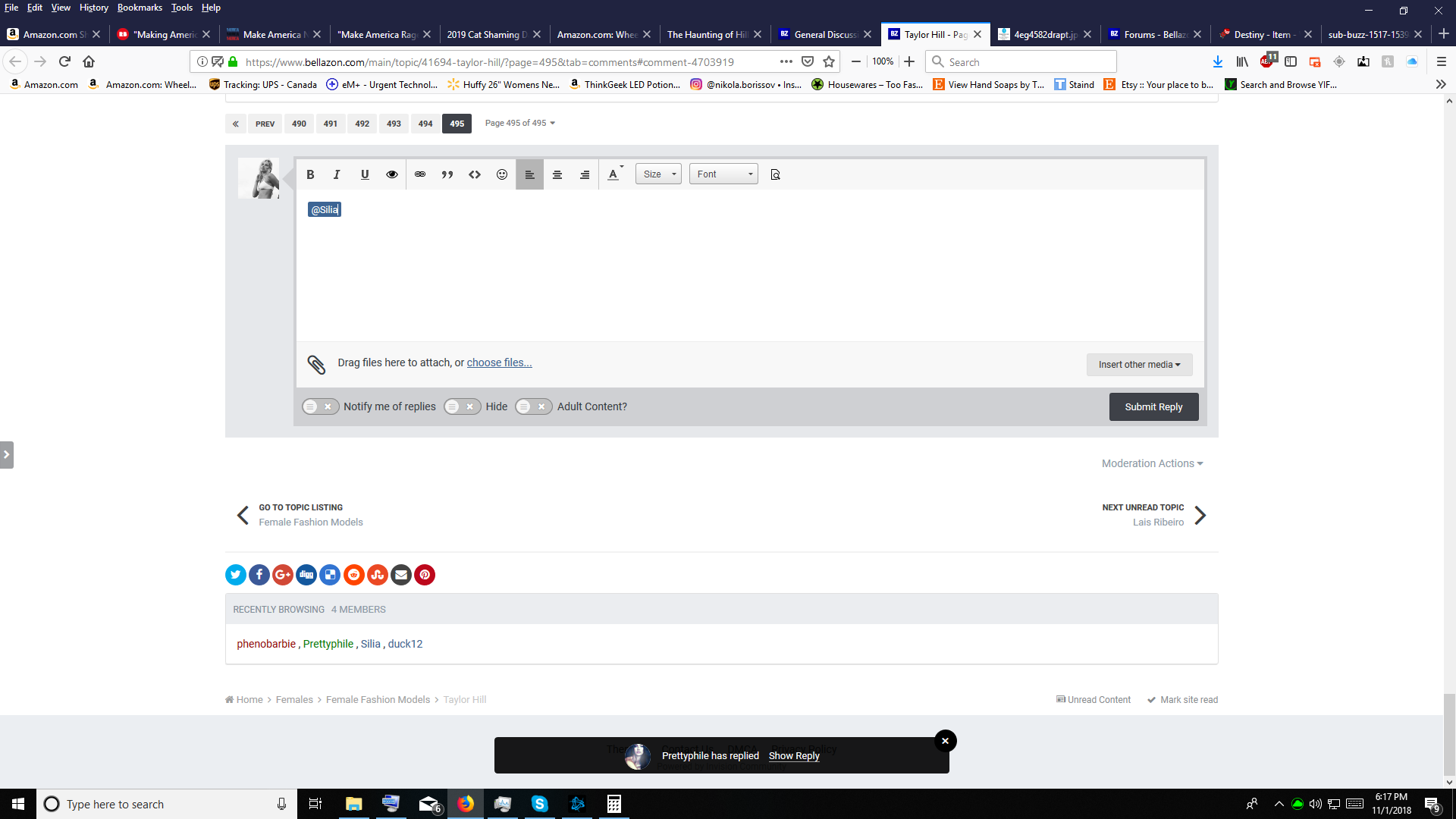
So I've been having a major issue with @(insert name here) feature working. As soon as I input my name as an example @Prettyphile half the time I cannot put a space after the name so I have to go into the source code just to get around it.